
Prompt Dex Skills
Prompt Dex Skills
When you don't know what to say to your AI.
Find and use a request that fits what you want to do.
It gives you a base for making and working. Refine the results with free prompts.
Choose your computer
See new features and changes in the release notes (KO). Earlier buyers can get the latest files in My purchases (KO).
Prompts vs. packs: what is the difference?
A prompt is a request you hand to an AI. A pack is a toolbox to start the work.
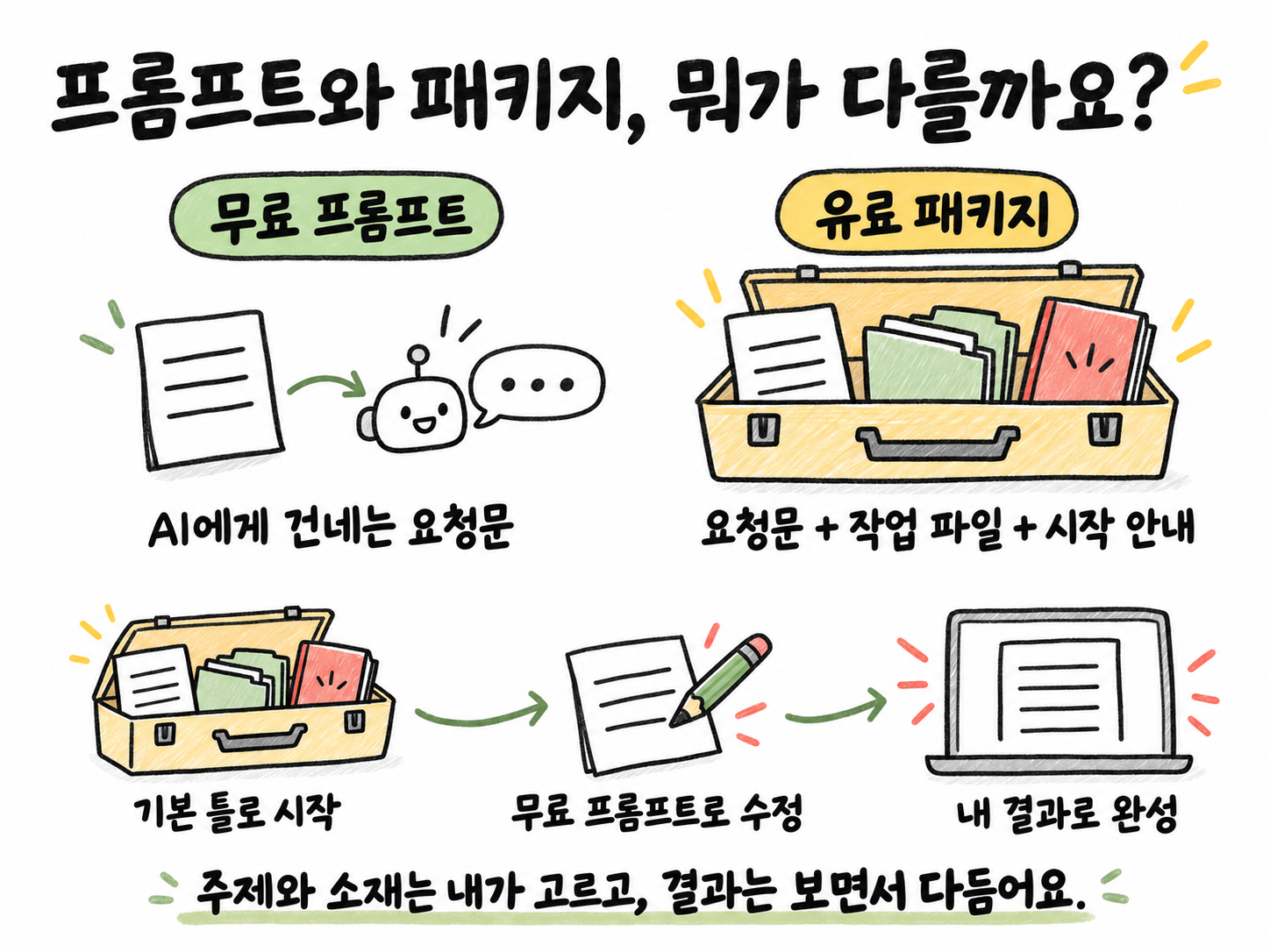
Free prompts
Pick a line that fits what you want to do and paste it into your AI. Use it to try things first or to fix results.
Paid pack
Requests plus working files and a start guide. Open the folder in your AI tool and start in order.
Start with a pack, refine with free prompts.
A single “do it” will not guarantee results like the examples. You pick the topic and material and keep fixing the result with your AI. AI costs and any outside services you choose are billed separately.
PACKAGE / AT A GLANCE
What the latest update includes
Material your AI can follow from install to finish.
Pick the one for what you want to do.
Carry on writing, photo and video work.
Make them with the example layouts.
Captions that follow the voice.
Sets up any missing programs.
Starts with a line to paste.
TOOLS / AT A GLANCE
Who does what?
01 · Ask in words
Claude Code / CodexTell it your topic and material.
02 · Make scenes
Your video · Kling · BlenderMakes 3D scenes when needed.
03 · Captions and motion
RemotionPolishes text, numbers and transitions.
04 · Combine and check
FFmpegCombines video and sound, and you watch it.
History, trivia and info videos start from motion editing. Animal memes and TV clips keep the original scenes and sound. Your AI helps install the tools you need.
Blender gets exploded-view and balance 3D starter scenes; Remotion gets caption, number-highlight and short transition templates. They are starting points you adapt with your AI. The new scenes in the example below were made with Kling.
Tool terms
- Remotion: individuals and organizations of up to 3 people should check the free terms. Others need a company license, which is not included in the price.
- Blender: can be used for commercial video. The included Blender scripts follow the GPL.
- FFmpeg · Pillow · Pretendard: we list their original terms and sources.
Tools are installed separately. AI, video and voice services are billed separately. Windows uses WSL Ubuntu.
WORKFLOW / AT A GLANCE
How one video gets made
It starts with “Make one like the trivia example, about ○○.”
- 01 Pick a type
What kind of video?
You choose - 02 Prepare material
Give it a video or a topic.
You + AI - 03 Prepare scenes
Picks material and makes any 3D it needs.
With AI - 04 Captions and edit
Polishes captions and motion in Remotion.
Pack helper - 05 Review and fix
Fix details with free requests.
You + AI
Play the file to the end. Tell your AI what to fix.
TV and entertainment process
Conversation video → the part where reactions build → two-line title
See an example →These 5 making features are in both Prompt Dex Skills and the Shorts Pack, so one is enough. AI costs and any video generation you choose are billed separately.
After you get it
- Unzip it and open the folder in Claude Code or Codex.
- Paste the start line.
- Write requests that fit your work with your AI.
Get the base, then shape it with your results
This pack is a base to start making. You can start with a short request, but you need to choose your topic and material and fix things as you see the results. Use the free Dex prompts to improve details and video quality to your taste. It does not guarantee results identical to the examples, or any quality or view count.
Check before you buy
- You need Claude Code or Codex. You don't need to pay for both.
- You need to be able to install programs on your computer.
- AI plans and any video or voice services you choose are billed separately.
🛠 Not on sale yet · card checkout is being set up
Windows and support
On Windows it uses Ubuntu, a free workspace. Please check the output files before turning on auto-posting.
Need help?
First, show the error to your AI. If that doesn't fix it, tell us your computer and the screen where you got stuck. Never send passwords. Contact